

Chapter 2
Bottomline use of generative AI tools
14 min read
Teachers and programs must, as said, operate within institutional and legal bounds. But often the VU Education Lab receives questions such as: What can I do as a teacher? What should I avoid? Can I oblige students to use generative AI? Can students refuse to use generative AI? Should I prohibit the use of generative AI or can I leave this up to the students? What AI system can I use? We think they need attention from the outset.
We emphasize again that within VU Amsterdam, the ‘Framework for generative AI in education’ is leading. But the framework is quite general and does not give (or intends to give) direct answers to the above questions, as many decisions are very context-dependent. The following is stated regarding the use of generative AI by students in the Framework: "It must be clear that the teacher or examiner indicates in the study guide, syllabus, or Canvas whether and how the use of generative AI is permitted. In addition, the learning objectives of the course are always leading. If AI literacy is not included in the learning objectives, it must be possible to take the course without the use of (generative) AI. In addition, the teacher must consider in advance the potential added value of students' use of AI for their education.”
#2.1Refusing or obliging students to use AI tools: what are the rules
The statement in the policy has multiple implications that can give some clear answers regarding the tool use by students and teachers. They do not solve the educational dilemmas we will dive into deeper later, but they do set the stage a bit clearer. Below you'll find the answers to frequently asked questions by teachers about AI (FAQs).
- Must I explain in my syllabus how students need to deal with generative AI?
Yes, according to VU Policy, you must always specify and explain for your course in your syllabus how students must deal with generative AI and why. - Can I prohibit the use of generative AI by students?
Yes, you can prohibit the use of AI. AI use by students will then decrease, but never entirely. Be aware of the consequence: the required monitoring or policing of students.- This is likely impossible to enforce with assignments that students work on at home without supervision (e.g. take-home exams, case studies, projects and report writing).
- This is possible in supervised conditions (e.g. exams, orals, presentations, and interview).
- Can I impose different levels of allowed use of generative AI?
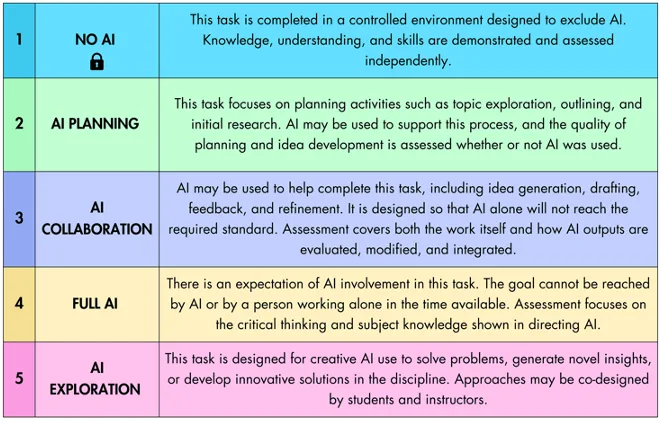
Yes, you can define such levels. Even within your course for specific parts of your course. Some faculties propose to use specific ladders of AI use, e.g. the AIAS scale (Perkins et al., 2024). VU faculties do: both the Faculty of Science and the School of Business and Economics work with a four-level scale derived from it.- Additionally: you can require students to write a transparency statement in which they explain how they used generative AI in producing their work. Apps exist that can help students write this statement in a comprehensive way, for example https://incantalupo.github.io/statement-of-work-generator/ (the VU Education Lab is working on a version for VU Amsterdam). A second generator, made at VU Amsterdam as part of Mary-Jo Diepeveen's PhD project, is at https://madiepev.github.io/academic-ai-integrity/disclosure-en.html, with a Dutch version alongside it. It asks for the tools and versions used, the tasks they assisted with, a few representative prompts, an estimate of how much of the work they carried, how the student checked the output, and a confirmation that no confidential data went in. The result is a disclosure statement the student can paste under their work.
- However, be aware of the consequence: the required monitoring or policing of students and increased levels of student anxiety about the precise meaning of such levels.
- Under which conditions can I ask students to work with AI?
- The conditions are these: You may only require generative AI tools for which VU Amsterdam has a license, or which run on local computers. And you must state in your syllabus that AI use is necessary to achieve the (AI literacy) learning objectives (see also Chapter 5).
- Your faculty may go further than this. The Faculty of Medicine, for instance, allows AI use to be made compulsory only where it is needed to achieve the learning outcomes, and requires the program to offer an equivalent alternative assignment to students who would rather not use AI. It also limits teaching to AI software that VU Amsterdam has officially verified. Check your own faculty policy before you make AI use a requirement.
- Do students have the right refuse to use generative AI for their course?
Yes, students have the right to refuse to use generative AI, unless it is stated in the syllabus that AI use is necessary to achieve the (AI Literacy) learning objectives (see also Chapter 5). - May students use generative AI for generating feedback on their work such as essays, reports and case studies?
If this particular use is allowed by you in your regulation laid down in your syllabus, the answer is Yes. Students can do this, but students must be aware of the limitations and variability of generated responses. Otherwise, it is prohibited. - Can I use generative AI detectors to check student work?
No, using such systems is not allowed because of their limited reliability (false positives and negatives) and privacy and copyright issues. Using Pangram for this purpose is also not allowed. - Can I force students to use generative AI?
Yes, you can, provided that you are following the conditions under 4.
The premise about this rule is, firstly, that we as a university must improve students AI Literacy by law (Digitale Overheid, 2025). Secondly we have an obligation as a university to prepare students for their future profession in which generative AI plays an increasingly big role. - Can I use generative AI for generating feedback on student work such as essays, reports, and case studies?
No, VU Amsterdam has not yet taken a formal position about this topic because of the complex legal requirements that need to be met and the variability of feedback generated by AI. For now, feedback may only be established by humans. - Can I use generative AI for generating grades on student work such as essays, reports, and case studies?
No, you cannot, VU Amsterdam has not yet taken a formal position about this topic because of the complex legal requirements that need to be met and the variability of grades generated by AI. For now, grades may only be established by humans. See Chapter 9 in which we describe possible practices and procedures that might be employed in some future. - May I upload documents in generative AI systems in general?
Yes, in general you can, but, within the context of use in a professional context of VU Amsterdam, you must limit this to systems that are licensed by VU Amsterdam. In all other cases, make at least sure that your data is not used for model training (most suppliers offer that opportunity. - May I upload documents in generative AI systems from a copyright perspective?
There are no clear answers for this question and the legal regulations are shifting and are interpreted in multiple ways. The University Library has a knowledge item about this topic from a copyright perspective with example use cases. If you want more information, get in touch with the University Library's Copyright Information Point (CIP). - Can I use generative AI for generating grades on open-ended questions for exams?
No, you cannot do this on your own because of regulations in the AI Act in which giving grades is categorized as a high risk application that requires careful organisational, legal and procedures to be in place. Further, the variability of grades generated by AI must also be brought under control. See Chapter 9 in which we describe possible future practices. - Can I use my own Vibe-coded App in my teaching?
No, you cannot. Vibe coded Apps are prohibited as they can impose security and privacy threats. Please contact the VU Education Lab to investigate how to proceed.
At VU Amsterdam, the use of shadow IT is a known issue as well. It is not permitted, and it is recognized that it happens nonetheless. From the perspective of data privacy and copyright (distributing copies of copyrighted material, and supplying data for model training), the rule is to use only applications that VU Amsterdam licenses and for which a Processor Agreement has been agreed. The most common applications and their appropriateness are listed below.
#2.1.1Which tools can you use?
The tools below are licensed by VU Amsterdam and have an agreed Processor Agreement in place. As a teacher, you cannot oblige students to use these tools. However, you could point your students to these tools if it could benefit their learning or tasks. When you do, discuss proper use with them, including attention to privacy, security and copyright, and, especially with video, environmental impact..
Microsoft Copilot for Web
Since February 2024, Microsoft Copilot for Web is available to VU students and staff. To use this chatbot compliantly, make sure to log in with your VU Amsterdam credentials.
Additional notes to keep in mind:
- VU Amsterdam offers the simple version of Copilot: Copilot for Web. VU Amsterdam has judged that user privacy is sufficiently guaranteed. However, Copilot does use Bing to conduct real-time searches on the internet as well. Users should be aware of this.
- VU Amsterdam does not have a license for 'Microsoft Copilot 365' and did not make it available to employees or students.
- Microsoft nor VU Amsterdam Employees have access to the conversations of individual users.
- Data is not used to train models and LLMs.
- Still, in all cases, users should refrain from uploading special and sensitive information via Copilot for Web such as research data, company information and the like.
Google Gemini and Gemini Notebook
VU Amsterdam has a long-standing license agreement with Google for Google Workspace for Education. Google Gemini and Gemini Notebook (formerly NotebookLM) are integral parts of this license. To use these tools securely, you need to log in with your VU Amsterdam credentials.
- VU Amsterdam has judged that user privacy is sufficiently guaranteed. However, Gemini does use Google Search to conduct real-time searches on the internet. Users should be aware of this.
- Still, in all cases, users should refrain from uploading special and sensitive information via Gemini or Gemini Notebook.
Doing research with LLMs
ITvO, short for IT voor Onderzoek or IT for Research, is the team inside the VU IT department that arranges infrastructure for research projects. Three of its services matter for work with language models. SciStor is scientific storage in the VU data centre. SciCloud lets you create and manage virtual machines. Ada is the university's HPC cluster. The capacity on Ada is modest, and for heavy training or very large models ITvO points researchers to Snellius, the national supercomputer run by SURF. Requests run through the VU Service Portal under the service domain Research, or by mail to itvo.it@vu.nl. An account on Ada needs endorsement from a supervisor.
Nebula is a service of the Network Institute at VU Amsterdam. It opened in March 2025 and gives VU researchers access to open language models that run on the university's own machines. Access is free at the time of writing and runs through a request form that needs a VU login. Nebula is offered to researchers for research; teaching use is not part of what the Network Institute advertises. Running models on campus does not lift the rules on personal data either. Sensitive data is not allowed on Nebula, and the platform publishes a DPIA checklist to help you work out what your own project needs. You can find more details abou Nebula at the website https://nebula.cs.vu.nl/welcome.
Locally run models
The safest way to work with data in AI tools is to use locally installed LLMs. This means downloading an LLM model on your computer and running it with, for example, LM Studio (Mac) or Ollama. The data will stay locally on your computer.
From a privacy and security perspective, this has advantages. First, you need a powerful machine to run models with sufficient capabilities and speed. Second, the data may reside on your computer, but this often introduces other kinds of vulnerabilities you should consider (e.g. make sure your computer or laptop and the data on it is safeguarded against theft).
The VU Education Lab can demonstrate how locally running models function.
#2.1.2AI Powered Scientific Search Tools
In the student edition of this Companion, you can find a (growing) number of specialized AI-powered search tools. In general, VU Amsterdam does not have a license with these companies.
#2.1.3AI tools to avoid or use consciously
VU Amsterdam does not have a processor agreement with OpenAI (nor Claude, Mistral, Qwen, Grok). So, everything you share with these systems can potentially be used by those companies for training purposes or tracking conversations and uploaded information. Their license structure and contents may vary, and to use these systems consciously and responsibly requires at the very least detailed knowledge about their user agreements. Therefore, it's important to never share personal data or other sensitive information with these companies (such as student names, e-mail addresses, grades, financial data, research or personal questions). Also check that you make the setting that your conversations and data are not used to train their models.
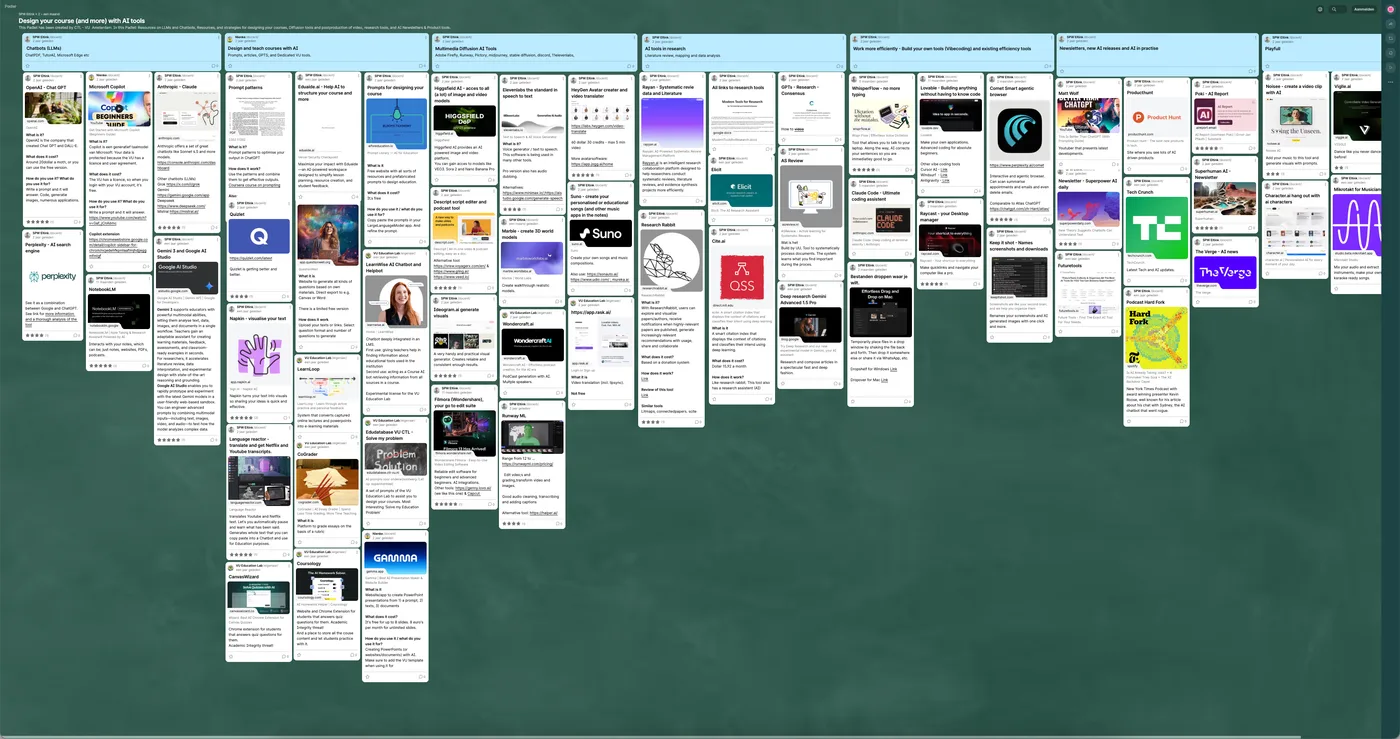
From a different perspective, especially to generate learning materials, privacy and security risks are relatively low, and it is up to the personal preference of teachers to decide what to use. In fact, a plethora of applications and publishing tools are now finding their way to the market. It is almost impossible to keep track of them. The VU Education Lab keeps a record of AI-driven tools for AI-generated content for educational purposes, from text, diagrams images up to video’s. But also, the large publisher houses incorporate AI-driven techniques to develop content and extend interactivity of their materials.
#2.1.4AI Powered educational tools
A (growing) number of specialized AI functionalities are incorporated into existing educational tools such as Canvas, Mentimeter and FeedbackFruits. VU Amsterdam has license agreements with these companies and privacy and data security are compliant.
VU CTL conducts experiments with these AI tools in those educational tools to test their functionalities and educational (added) value (such as the generation of educational materials, videos, knowledge clips, AI bots, feedback generation, grading, and AI Avatars). VU CTL looks for the balance between the added value and the cost these systems carry, both in terms of licensing cost, but also the wider educational or societal or environmental impact cost.
New tools will also continue to emerge. In February 2026, Cogniti was introduced at VU Amsterdam as a pilot by the VU Education Lab. This tool will likely become more widely used at VU Amsterdam. Cogniti is a system with which a teacher can build specialized bots and mini apps via edubots.vu.nl. Cogniti runs on the private and secure VU Azure environment. Conversations and data are not used to train LLMs, and Microsoft has no access to conversation and data. You can find more information about Cogniti at the Canvas Tools for Education site.
#2.1.5Future developments
The technology and vendor landscape is changing quickly. VU Amsterdam, SURF and IT constantly monitor developments and will provide alternatives if needed in due time. For now, the most up-to-date information can be found on this page about Generative AI Chatbots on Tools for Education.